Overview
DFOS (Digital Factory Operating System) is a SaaS platform that enables manufacturers to replace paper-based processes with digital workflows, helping teams manage operations, audits, maintenance, compliance, and inspections in a single platform.
My Role
UX/UI Designer
Duration
Iterative Redesign
Reading Time
7 min
Team
PM, UX Designer & Engineering Team
Problem Statment
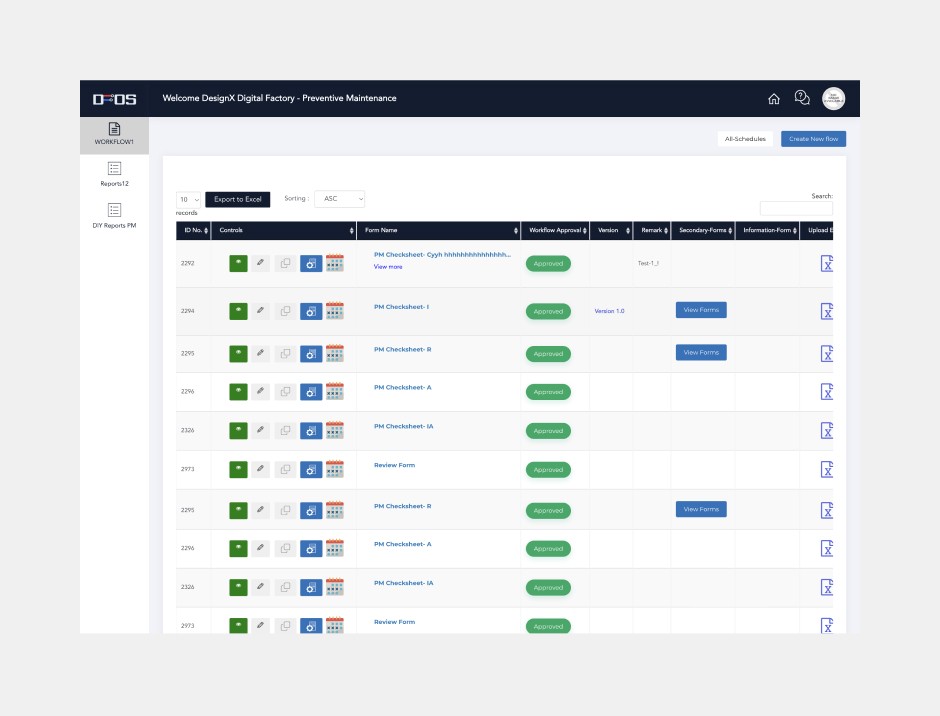
The DFOS platform was originally developed without structured product ownership or UX involvement, resulting in a system that prioritized feature delivery over usability.
UX & Usability Problems
Accessibility Issues
Product & Process Gaps
Reduced user trust

Goals
Primary goal
Constraints
The Design Process
A flexible and iterative process tailored to DFOS's business goals, user needs, and project constraints.

Research
Exploratory Research
Before proposing solutions, I spent time understanding how users interacted with the platform and where they experienced friction.
Research Activities
• Stakeholder interviews
• User interviews
• Surveys
• Competitive analysis
• Workflow reviews
Key Findings
Users were spending too much time locating information and completing routine tasks. Many workflows felt disconnected, creating confusion and inefficiencies.
Main Insight
Users didn't need more features—they needed a clearer and simpler way to use the features that already existed.

Conducted competitive analysis across industry-leading and emerging solutions to identify best practices, gaps, and opportunities for DFOS.

Conducted surveys with internal teams and plant operators to identify user needs, challenges, and workflow gaps. Survey Link: Survey Link
Key Problems Identified
Lack of Guidance
Users were often unsure what action to take next within workflows.
No Feedback Loop
The system provided limited opportunities for users to report issues or share suggestions.
Accessibility Challenges
Important information was difficult to scan and prioritize.
Inconsistent Experience
Different modules behaved differently, making the product harder to learn.
Excessive Jargon
The platform relied heavily on technical and domain-specific terms, making it difficult for users to understand and navigate workflows.
Reduced Client Trust
The outdated product experience made it harder for sales and marketing teams to build client trust, leading to lost opportunities.
User Persona
Built a user persona from research to uncover user goals, needs, and pain points.

Design system
Implementing Design System
Due to time and resource constraints, we decided to leverage an existing design system instead of building one from scratch.
After evaluating various design system like Ant Design, Atlassian, and MUI, we selected MUI because it aligned well with our React-based product, provided most of the required components, and supported both light and dark themes for different user environments.


Component Library
Component Library & Documentation
A reusable component library was created with documentation, usage guidelines, and responsive behaviors to ensure consistency across design and development.

User Matrix
Tracking Adoption & Engagement
Implemented Mixpanel to track user adoption, engagement, and feature usage, to understand user behaviour and measure the impact of the redesign.


New UI & Old UI Toggle button
New UI & Old UI Toggle
A temporary toggle was introduced to let users switch between the old and new UI. This enabled a gradual transition, reduced resistance to change, and helped us understand adoption patterns and reasons users preferred one experience over the other.
Light Theme Dark Theme
Designed for Every Environment
Both light and dark themes were designed to support different working environments and user preferences.
Design file
50+ Screens Designed
Created screens across multiple modules while maintaining a unified experience.

A snapshot of screens designed during the redesign process.
Before After screens
Visual Transformation
A comparison of the old and redesigned screens, highlighting improvements in usability, clarity, and consistency.


Explore More Case Studies
Follow up case study
Explore individual case studies to see how specific features and screens were redesigned throughout the DFOS project.

Mobile App Redesign
Redesigned the mobile experience to simplify field and enable faster task completion on the go.
Coming Soon

Key Learnings
Designing for real workflows matters.
Understanding manufacturing operations helped create solutions that aligned with users' daily tasks and challenges.
Consistency drives adoption.
A unified design system improved usability, reduced confusion, and created a scalable product foundation.
Research and collaboration create impact.
User feedback and close collaboration across product, engineering, sales, and operations teams were key to making informed design decisions and delivering a successful redesign.